 MemoryLane
If your photographs already live in carefully named folders, old external drives, exported phone libraries, and years of camera card backups, reorganizing everything may be the riskiest place to begin. You can often get much further by leaving the files where they are and building a searchable, visual index around them.
This separates two jobs that are often confused. Storage answers where are the original files? Organization answers how can I find and understand them? The folder tree can remain the durable storage system while an index adds thumbnails, dates, locations, tags, camera information, and other ways to browse.
First, find out what you have
Before choosing software or changing folders, make a simple list of where the archive lives. Include internal disks, external drives, network shares, Apple Photos libraries, phone exports, and any boxes of older media that have not yet been copied. Alongside each location, note whether it holds original files, a backup, or a mixture of the two.
This first pass often reveals that organization is only part of the problem. There may be several incomplete copies, a drive with no backup, or a mixture of originals and exports whose relationship is unclear. If you start moving files before sorting out those questions, duplicate detection and recovery can become harder than they need to be.
Remember that an index is not a backup. Although thumbnails, search data, and tags can make an archive much easier to use, they cannot replace another copy of the original photographs, which should always be backed up independently.
Think of the archive as three layers
This distinction is useful when you plan your backups. The originals are irreplaceable, while most of the index can be rebuilt by scanning them again. Your curation may occupy very little disk space, but it represents hours of attention, so the library database that contains it deserves a backup as well.
Keep a folder structure that still makes sense to you
You do not need a perfect hierarchy. A modest structure, perhaps a year followed by an event or project, is usually enough when dates and metadata provide other routes into the collection. Deep folder trees with a category for every person, place, and subject soon become awkward because the same photograph can belong to several categories at once.
Folders are still valuable because they are portable and easy to understand. A folder called 2019/2019-08 Maine will make sense even when you are not using a particular application, while tags, people, maps, and search can describe everything that overlaps that structure without forcing a file into several places.
If your current folders are inconsistent but usable, leave them alone during the first indexing pass and spend some time browsing the results. Once you understand where the real problems are, you can rename or consolidate folders when the benefit is clear, making one reversible change at a time.
Let metadata do the repetitive work
Most digital photographs already carry useful information, including the capture time, camera and lens, exposure settings, file type, and sometimes GPS coordinates or keywords. An organizer can turn that information into filters and reports without changing the photograph itself.
Metadata is rarely perfectly tidy because scans may have no capture date, edited exports can inherit misleading dates, and a camera with an unset clock can create a sudden jump in the timeline. It is better to treat metadata as useful evidence rather than unquestionable truth, while preserving the original values whenever you make corrections in a catalog.
For a RAW workflow, it also helps to decide how paired files should appear, since a RAW file and its matching JPEG are usually two representations of one exposure rather than unrelated photographs. Grouping them in the interface reduces clutter while keeping both originals available, and bursts, Live Photos, and sidecar files benefit from similar treatment.
Add human organization sparingly
Once the automatic index is useful, add the information only you can supply. Favorites, a few durable personal tags, named people, and carefully chosen stacks can be more valuable than hundreds of narrow categories.
- Use favorites for photographs you genuinely want to return to, not as a substitute for ratings you never revisit.
- Prefer stable tags such as a family branch, long-running project, or meaningful event.
- Keep generated tags distinguishable from your own so they can be corrected or removed.
- Avoid rewriting original files merely to suit a new application unless you understand what that will mean for backups and compatibility with other software.
Clean up through a review queue
Large archives inevitably collect screenshots, accidental frames, failed exports, and near-duplicates. A careful cleanup process works better as a sequence than as a single delete button. You can mark possible removals, hide them from everyday browsing, review them together, move selected originals into a visible trash folder, and leave permanent deletion until you have checked the group once more.
Related files should move together, since deleting a JPEG while leaving its RAW file, Live Photo video, or XMP sidecar behind simply creates another kind of clutter. Before trusting any automated cleanup tool with the full archive, try it on a small copied folder and confirm exactly what it considers a companion file.
Make rediscovery part of the system
An archive can be meticulously organized and still remain unseen, so useful organization should provide gentle ways back into it. Photographs from this date in earlier years, a random memory, a map, a person through time, or a camera you have not used in a decade can all offer a reason to look again. These views are valuable when they help the catalog become part of how you experience the collection, rather than merely a record of where everything is stored.
A good structure is not necessarily the one with the most categories. It is the one that helps you answer ordinary questions, such as where you went that summer, which lens you carried, which photographs of a person you have forgotten, or what is on a drive before you open every folder.
How MemoryLane approaches it
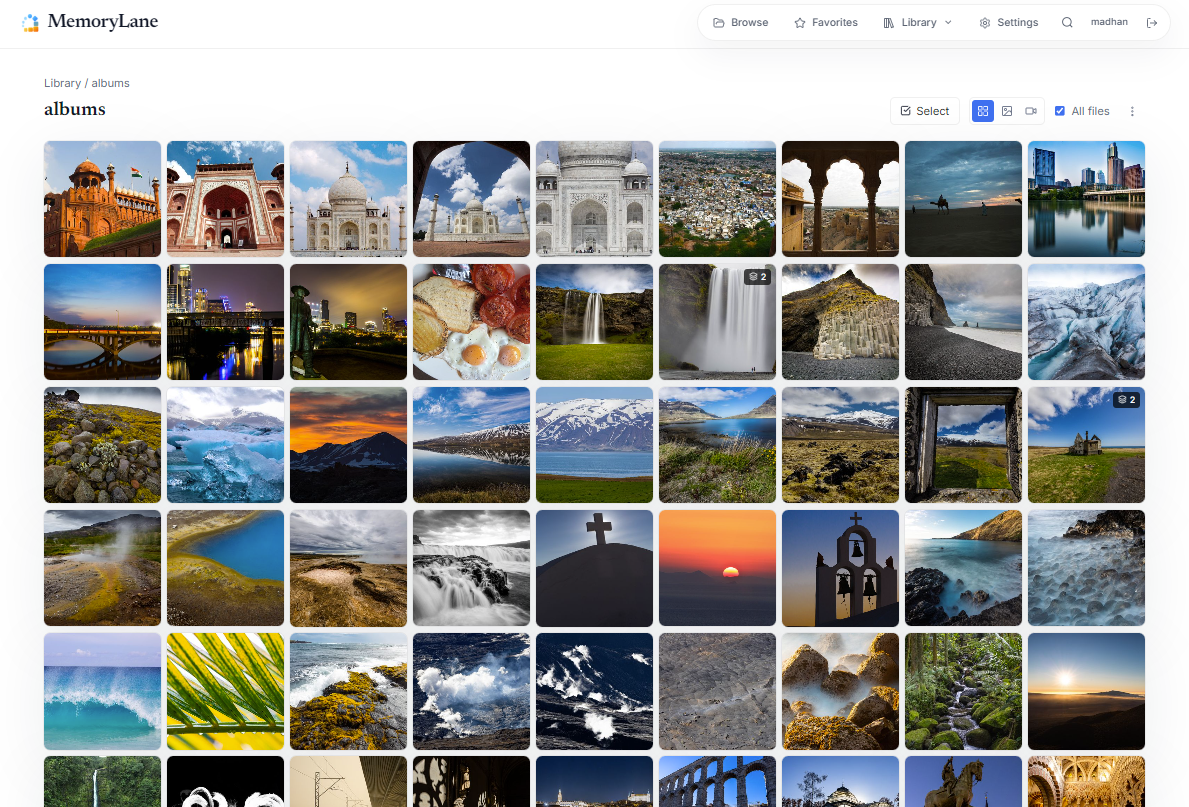
MemoryLane indexes the photo and video folders you choose while leaving the originals in place. It creates local thumbnails, previews, metadata, and search indexes for browsing. Folder views remain available alongside dates, favorites, tags, people, locations, cameras, lenses, and optional local search.
Generated data can be rebuilt from the originals, while personal work such as favorites, tags, named people, manual stacks, and cleanup decisions lives in the MemoryLane library database and should be included in your backups. MemoryLane is intended for organization and rediscovery, and it does not replace either a proper backup system or a RAW developer.
Try it on the archive you already have
MemoryLane is free and open source under the MIT license. Inspect the project first, or point it at a small representative folder before indexing a larger archive.