 MemoryLane
A RAW archive often contains the most flexible version of a photograph, yet those files may be the least convenient to browse outside an editor. The answer is not to convert or relocate everything. A visual index can make the archive approachable while leaving each original intact.
Why RAW browsing feels slow
A RAW file is not simply a large JPEG. It contains sensor data, camera metadata, and usually one or more embedded previews. Fully developing that sensor data every time a folder opens would be wasteful, so a photo library needs a quicker way to produce consistent thumbnails and screen-sized previews.
Many cameras include a useful embedded JPEG that already reflects the camera's orientation and picture settings. Extracting it is often the fastest route to browsing, although the quality and size vary by model. When the embedded preview is too small or unavailable, the library may need to render one, which takes more time during the first scan.
Keep the original format visible
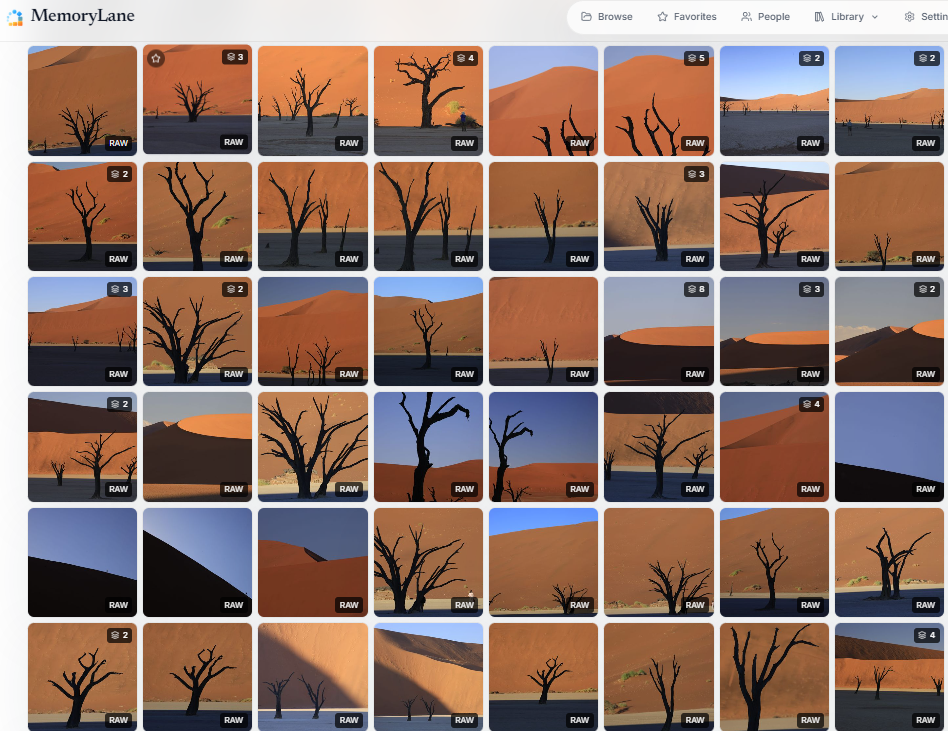
A preview makes a RAW file easy to see, but the interface should still identify the underlying format. A visible RAW badge helps distinguish an original capture from an exported JPEG and makes it easier to understand what will open in an editor.
Format support should be described by actual camera families rather than the word RAW alone. Canon CR2 and CR3, Nikon NEF, Sony ARW, Fujifilm RAF, Olympus ORF, Panasonic RW2, Pentax PEF, and Adobe DNG have different histories and edge cases. Testing a few files from each camera you own is wiser than assuming that one successful sample covers the entire archive.
Treat RAW and JPEG as a pair
Photographers often save both formats for the same exposure. The JPEG may be ready to share, while the RAW file preserves room for later development. Showing them as unrelated photographs makes the library look duplicated and can separate the pair during cleanup.
A sensible organizer recognizes matching basenames and capture details, presents one entry with both files behind it, and keeps the relationship intact when files are moved. It should also let you inspect which version is present rather than hiding the pairing completely.
Use stacks for bursts and variations
A burst may contain a dozen frames that differ only in expression or focus. Stacking them behind a chosen cover keeps the folder readable without deleting the alternatives. The same approach can group bracketed exposures, edited versions, or related frames when automatic rules would be too uncertain.
Manual decisions should take priority over later automatic regrouping. If you split a frame from a burst or choose a different cover, the next scan should respect that choice.
Let metadata lead back to the work
RAW files often contain the richest camera metadata in the archive. Once indexed, the camera, lens, focal length, aperture, shutter speed, ISO, date, and keywords become reliable ways to find a shoot or follow a piece of equipment through time. Manufacturer-specific fields can add useful detail when the reader understands them.
Sidecar files need equal care because an XMP file may contain ratings, keywords, or editing instructions created elsewhere. Even when an organizer does not interpret every field, it should avoid separating the sidecar from its original during cleanup.
Know where organization ends
A photo organizer can preview, search, group, tag, and report on RAW files without becoming a RAW developer. Tasks such as demosaicing choices, color profiles, local adjustments, and export remain better suited to editing software. Keeping that boundary clear reduces the chance that a catalog will create unexpected derivatives or alter an established workflow.
How MemoryLane handles RAW archives
MemoryLane extracts correctly oriented previews, reads metadata through ExifTool, labels RAW files, and pairs matching RAW and JPEG versions as one photograph while preserving both originals. Related frames can be stacked automatically or by hand, and manual stack changes remain under your control.
The same indexed metadata powers EXIF reports, camera and lens histories, and the Gear Museum. MemoryLane does not develop RAW photographs, so your editor remains responsible for the finished image.
Make the older RAW folders visible again
Start with files from two or three cameras so you can confirm previews, orientation, pairing, and metadata before indexing the full archive.